

 X
 Discord
 Instagram
 YouTube
 ChatGPT
Settings
Which markets the screener follows, which columns it shows, how long signals stay and how each engine is tuned.
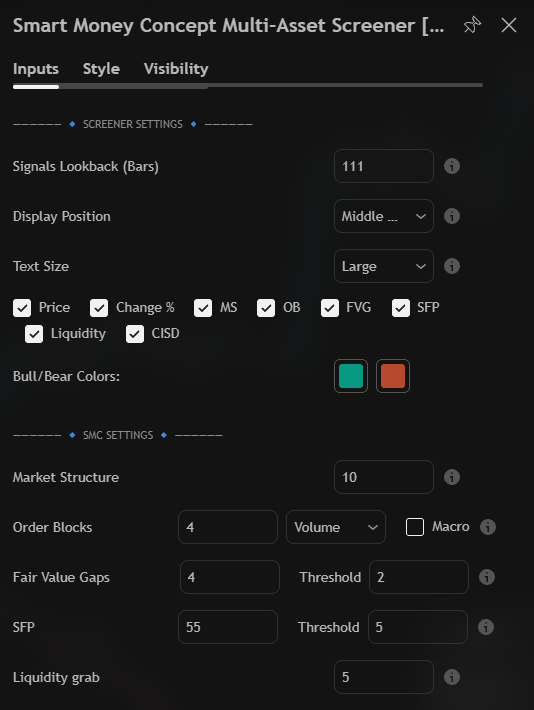
Screener Settings
| Setting | Purpose |
|---|---|
| Signals Lookback (Bars) | How long any signal stays before it fades to - |
| Display Position | Where the table sits on the chart |
| Text Size | Text size of every cell |
| Price, Change %, MS, OB, FVG, SFP, Liquidity, CISD | One checkbox per column |
| Bull/Bear Colors | The two colours used by every cell |
Signals Lookback is the memory of the whole screener:
- Short — only recent events. Good for scanning many markets.
- Long — keeps context. Good for following a few positions.
Turning a column off removes it from the table, so a trimmed table is actually smaller.
SMC Settings
| Setting | Controls |
|---|---|
| Market Structure | How far back the structure engine looks |
| Order Blocks | History length, detection mode (Volume default) and a Macro filter |
| Fair Value Gaps | History length and a Threshold for small gaps |
| SFP | Swing length and a Threshold for sweep size |
| Liquidity grab | How far back pools and grabs are tracked |
- Longer lengths make an engine more selective — usually better on higher timeframes.
- Higher thresholds remove marginal events; lower ones show more.
Select Assets
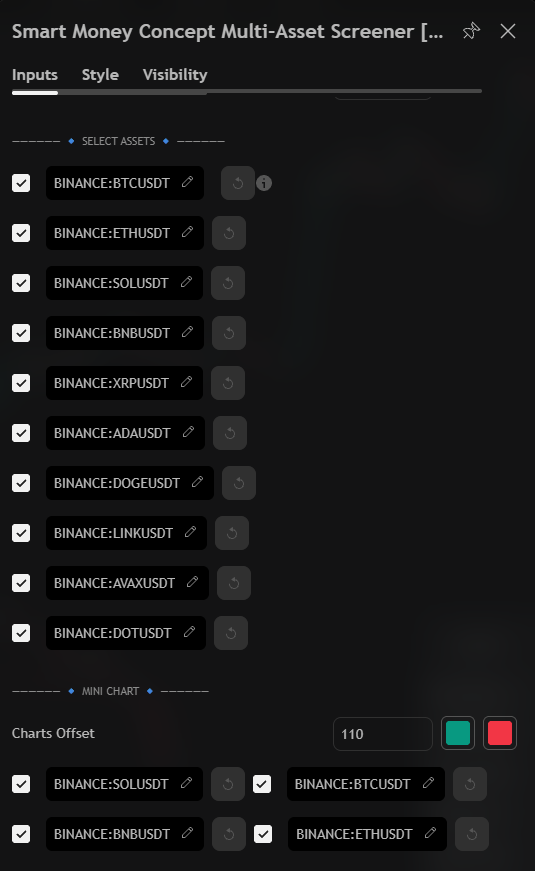
Up to ten symbols. Each slot has a checkbox, a ticker field and a reset button. The info icon shows the exchange and precision the ticker resolves to.
Disabled slots leave the table, so it shrinks instead of showing empty rows.
Mini Chart
Four checkboxes choose which symbols are drawn as mini charts, Charts Offset moves them along time, and the two swatches set their colours.
Alert Settings
Controls the alerts. One alert covers every symbol in the table.
