

 X
X Discord
 Instagram
 YouTube
 ChatGPT
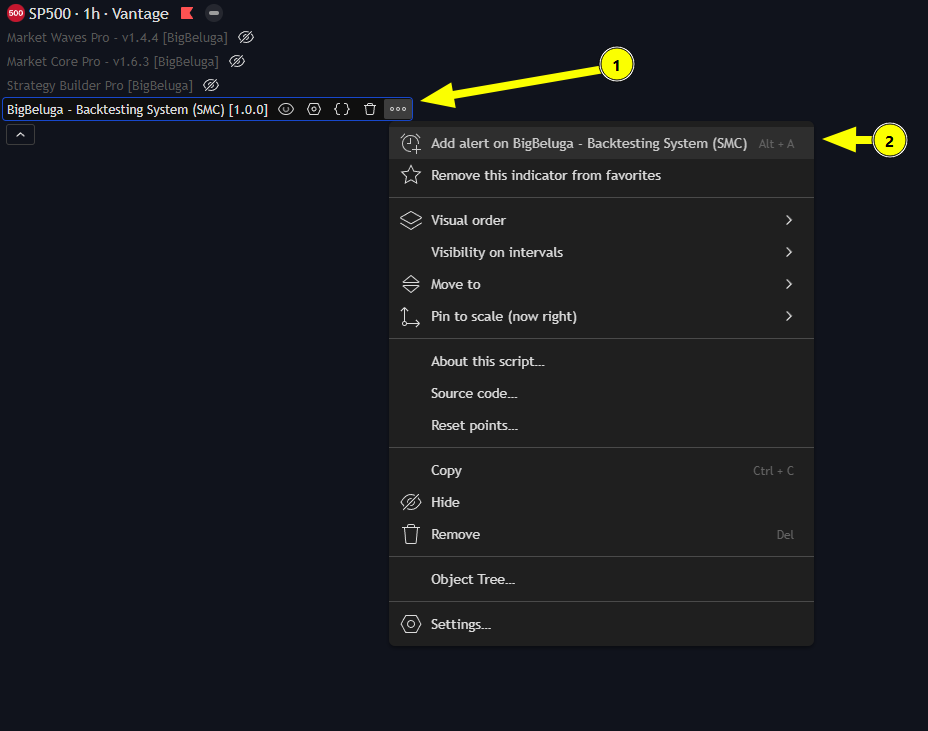
Alerts
Add Alert
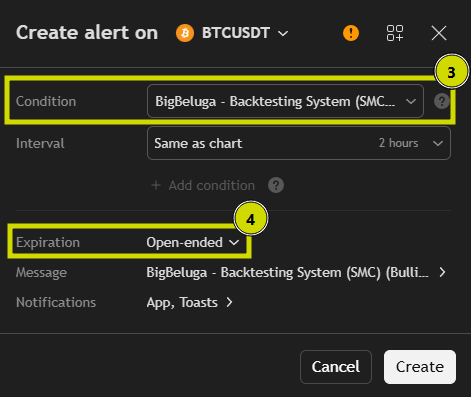
Set Condition and Expiration Date
Customize the Alert Message
Enter a clear Alert Name and edit the Message that will appear when the alert triggers.\ You can also add placeholders like
{{ticker}}- ticker of the symbol used in alert (AAPL, BTCUSD, etc.){{interval}}- returns the interval (i.e. timeframe/resolution) of the chart that the alert is created on{{strategy.position_size}}- returns the value of the same keyword in Pine, i.e., the size of the current position.{{strategy.order.action}}- returns the string “buy” or “sell” for the executed order.{{strategy.order.contracts}}- returns the number of contracts of the executed order.{{strategy.order.price}}- returns the price at which the order was executed.{{strategy.order.id}}- returns the ID of the executed order (the string used as the first parameter in one of the function calls generating orders: strategy.entry, strategy.exit or strategy.order).{{strategy.order.comment}}- returns the comment of the executed order (the string used in the comment parameter in one of the function calls generating orders: strategy.entry, strategy.exit or strategy.order). If no comment is specified, then the value of strategy.order.id will be used.{{strategy.order.alert_message}}- returns the value of the alert_message parameter which can be used in the strategy's Pine code when calling one of the functions used to place orders: strategy.entry, strategy.exit or strategy.order. This feature is only supported in Pine v4 and higher.{{strategy.market_position}}- returns the current position of the strategy in string form: “long”, “flat”, or “short”.{{strategy.market_position_size}}- returns the size of the current position as an absolute value, i.e. a non-negative number.{{strategy.prev_market_position}}- returns the previous position of the strategy in string form: “long”, “flat”, or “short”.{{strategy.prev_market_position_size}}- returns the size of the previous position as an absolute value, i.e. a non-negative number.
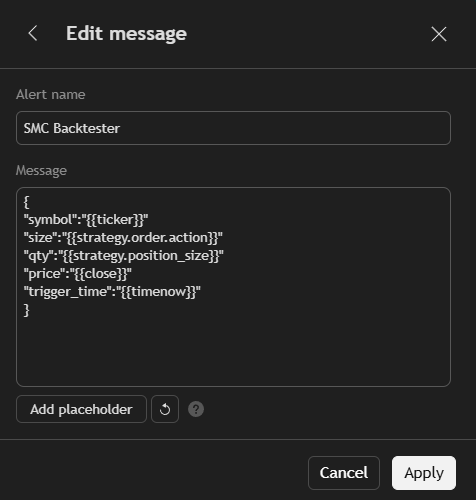
Example:\ Alert name: SMC Backtester\ Message:
{
"symbol":"{{ticker}}"
"size":"{{strategy.order.action}}"
"qty":"{{strategy.position_size}}"
"price":"{{close}}"
"trigger_time":"{{timenow}}"
}
Click Create Alert
Once all settings are configured — click Create Alert to activate it.\ Your alert will now monitor the (SMC) Backtester trades automatically and send a notification as soon as the trade appears.
