

 X
 Discord
 Instagram
 YouTube
 ChatGPT
Settings & Symbols
Everything the screener shows, how big it is and which markets it follows is set in the indicator inputs.
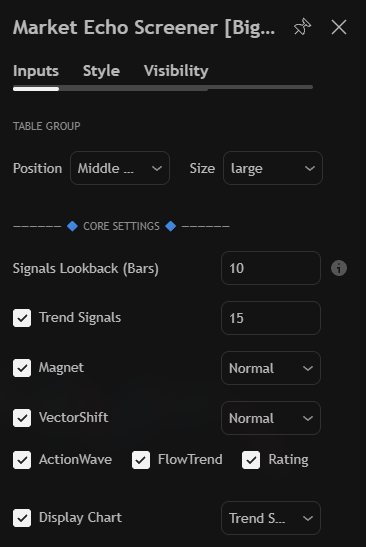
Table Group
| Setting | Options | Purpose |
|---|---|---|
| Position | Middle Right (default) and seven other corners | Where the table sits |
| Size | tiny, small, normal (default), large, huge | Text size |
Core Settings
| Setting | Default | Purpose |
|---|---|---|
| Signals Lookback (Bars) | 200 (5–500) | How many bars a signal or retest stays on the table |
| Trend Signals | on | Shows the Trend Signal column |
| Sensitivity | 15 (0.5–100) | How fast the signal engine reacts |
| Magnet | on | Shows the Magnet column |
| Magnet length | Normal | Scalp, Normal or Macro |
| VectorShift | on | Shows the VectorShift column |
| VectorShift length | Normal | Scalp, Normal or Macro |
| ActionWave | on | Shows the ActionWave column |
| FlowTrend | on | Shows the FlowTrend column |
| Rating | on | Shows the Beluga Rating column |
Signals Lookback (Bars)
This one value sets the memory of the whole table.
- Short (20–50 bars) — only fresh events survive. Good for scanning many markets.
- Long (200+ bars) — states stay long enough to plan around. Good for a small watchlist.
- When a signal ages out it becomes
--, and retest cells fall back to the plain reading.
Sensitivity
Lower follows price more closely and flips earlier. Higher needs stronger evidence and stays longer.
Engine lengths
Scalp is the most reactive, Normal the balanced middle, Macro follows only the dominant condition.
Display Chart
Adds the visualizer.
| Setting | Options | Purpose |
|---|---|---|
| Display Chart | on / off | Shows or hides the meter |
| Chart type | Trend Score (default), Volatility | What the meter plots |
Symbols
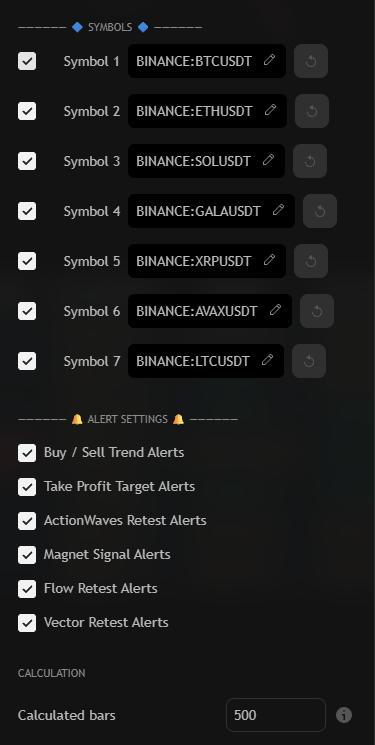
Up to seven symbols. Each slot has a checkbox, a ticker field and a reset button.
The defaults are BTCUSDT, ETHUSDT, SOLUSDT, GALAUSDT and XRPUSDT; slots 6 and 7 (AVAXUSDT, LTCUSDT) are off until enabled. Disabled slots leave the table, so it shrinks instead of showing empty rows.
Alert Settings
The last group controls the alerts. One alert covers every symbol in the table.
