

 X
 Discord
 Instagram
 YouTube
 ChatGPT
Alerts
Get notified when anything changes in the table.
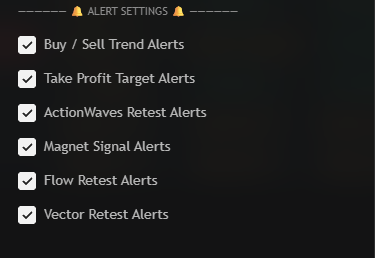
What you can alert
| Setting | Fires when |
|---|---|
| Buy / Sell Trend Alerts | A row turns BUY or SELL |
| Take Profit Target Alerts | A take profit level is reached |
| ActionWaves Retest Alerts | An ActionWave retest appears |
| Magnet Signal Alerts | A Magnet signal appears |
| Flow Retest Alerts | A FlowTrend retest appears |
| Vector Retest Alerts | A VectorShift retest appears |
Only enabled symbols can trigger an alert.
Message format
TICKER | Price: <price> | Signal: <signal name>
Examples:
BTCUSDT | Price: 66040.72 | Signal: + BUY ✓✓₂ETHUSDT | Price: 3245.1 | Signal: Take Profit 3 Hit ✅SOLUSDT | Price: 151.09 | Signal: Flow: ⬆ RetestGALAUSDT | Price: 0.01862 | Signal: Magnet: ⬆ Bull Signal
The ticker has no exchange prefix, so the message is easy to parse in a bot.
Create the alert
Add the screener
The alert is tied to the indicator, so add it to a chart first.
Tick your events
In Alert Settings, enable the events you want. Unticked events never alert.
Create the alert
In TradingView, pick the screener as the condition and choose Any alert() function call.
Pick a trigger
Once per bar is recommended. Once per bar close waits for the bar to finish.
Add a webhook (optional)
Paste your endpoint in the webhook field to forward every signal.
Notes
- One alert covers the whole table. The ticker in the message tells you which row fired.
- Start small. Trend and take profit alerts first, retests later.
- The alert runs on the chart's bars. Each row is still read from its own symbol.
