> For the complete documentation index, see [llms.txt](https://docs.bigbeluga.org/llms.txt).
> Markdown versions of documentation pages are available by appending `.md` to page URLs; this page
> is available as [Markdown](https://docs.bigbeluga.org/toolkits-pro-plus/market-waves-pro/any-alert-function-call.md).
# Any alert() Function Call
Market Waves PRO+ sends every module through a single TradingView alert. Instead of one alert per
signal — and running out of alert slots — you choose which events matter inside the indicator settings
and let one `Any alert() function call` alert carry all of them.
## Before you start
An alert mode only works while its module is enabled. The AlphaWave rows need **Alpha Wave** on, the
Pixel rows need **Pixel Trend** on, the three TF rows need **Multi TF Trend** on, and the sweep row
needs **Reversal Signals** with **Level** on. Pixel Retest additionally needs **Show Fibonacci OTE**
and **Show Mean Reversion**, because it is built from a rejection inside the OTE zone.
While a module is switched off, its alert dropdown stays inactive.
## What you can alert on
| Module | Alert modes |
| ------------------ | ----------------------------------------------------------------- |
| AlphaWave Trend | Any trend flip, bullish enter, bearish exit |
| AlphaWave Retest | Any retest, bullish retest, bearish retest |
| Pixel Flip | Any flip, pixel bull flip, pixel bear flip |
| Pixel Retest | Any pixel retest, pixel bull retest, pixel bear retest |
| TF1 / TF2 / TF3 | Any TF flip, TF bull, TF bear — one row per higher timeframe |
| Reversal Signal | Any reversal, bull reversal, bear reversal |
| Reversal Sweep | Any sweep, bull sweep, bear sweep |
## Setting up the alert
{% stepper %}
{% step %}
### Enable the module on the chart
Turn the module on before configuring its alert. If the chart is not drawing the signal, there is
nothing for the alert to read.
{% endstep %}
{% step %}
### Choose the alert mode
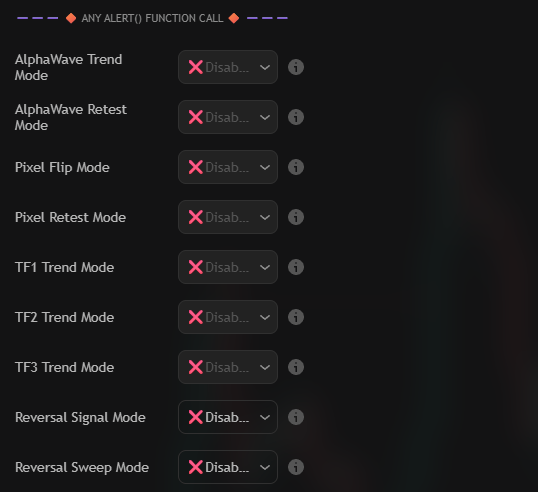
Open the `🔶 Any alert() function call 🔶` group and change the dropdown for the module from
`❌Disabled` to the event you want. Every module keeps its own dropdown, so one alert can listen to a
trend flip, a pixel retest and a reversal sweep at the same time.
The nine alert modes of Market Waves PRO+, one dropdown per module
{% endstep %}
{% step %}
### Write the message template
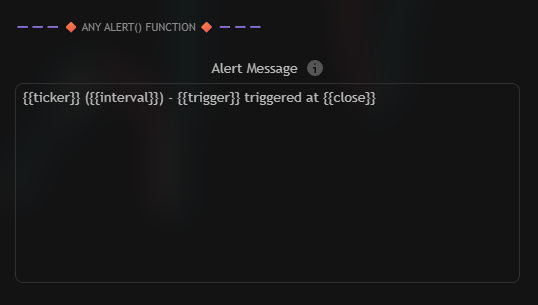
The template is the payload every alert sends — both the popup and the webhook body. Placeholders are
replaced the moment the alert fires.
The Alert Message box that carries every module event
```
{{ticker}} ({{interval}}) - {{trigger}} triggered at {{close}}
```
| Placeholder | Description |
| --------------- | ---------------------------------------------------------------------- |
| `{{ticker}}` | Symbol name without the exchange prefix, e.g. `BTCUSDT`. |
| `{{tickerid}}` | Full ticker identifier, e.g. `BINANCE:BTCUSDT`. |
| `{{exchange}}` | Exchange prefix of the current symbol. |
| `{{close}}` | Close of the current bar. |
| `{{open}}` | Open of the current bar. |
| `{{high}}` | High of the current bar. |
| `{{low}}` | Low of the current bar. |
| `{{volume}}` | Volume of the current bar. |
| `{{interval}}` | Chart timeframe, e.g. `15` or `W`. |
| `{{timenow}}` | Current time when the alert fires. |
| `{{trigger}}` | Name of the event that fired — this is what distinguishes the modules. |
| `{{description}}` | Description of the current symbol. |
| `{{country}}` | Two-letter code of the trading country, e.g. `US`. |
| `{{root}}` | Root for derivatives, e.g. `ES` for `ES1!`. |
| `{{industry}}` | Industry of the symbol, or `na`. |
| `{{type}}` | Market type, e.g. `crypto`. |
{% endstep %}
{% step %}
### Create the TradingView alert
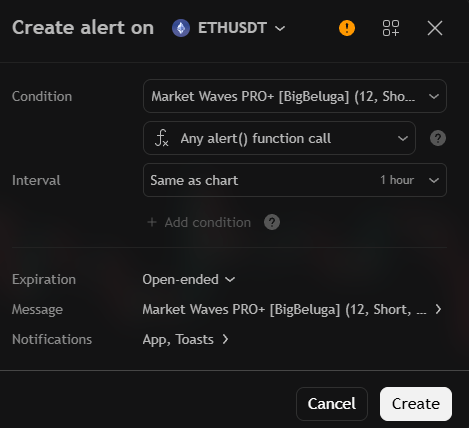
Press Alt + A (or the clock icon in the right toolbar) and configure the dialog:
- **Condition:** `Market Waves PRO+`
- **Second dropdown:** `Any alert() function call`
- **Message:** leave the default placeholder text if you want the template above to be used, or paste a
fixed message when you only need a trigger.
The TradingView dialog for a single Any alert() function call alert
Create the alert once. Every module event you enabled in the settings now flows through that single
alert slot.
{% endstep %}
{% endstepper %}
{% hint style="info" %}
The `{{trigger}}` placeholder is what makes a shared template readable. Two alerts from different
modules produce different text, so you can tell a pixel flip from a reversal sweep without opening the
chart.
{% endhint %}
## Webhooks and automation
Because the template is the request body, the same alert can drive a webhook: point the TradingView
notification at your endpoint and parse `{{trigger}}` to route each event. For sequences that should
only fire when several conditions line up, use
[Custom Step Alerts](/toolkits-pro-plus/market-waves-pro/custom-step-alerts).