> For the complete documentation index, see [llms.txt](https://docs.bigbeluga.org/llms.txt).
> Markdown versions of documentation pages are available by appending `.md` to page URLs; this page
> is available as [Markdown](https://docs.bigbeluga.org/toolkits-pro-plus/market-core-pro/custom-step-alerts.md).
# Custom Step Alerts
Custom Step Alerts chain several conditions into one sequenced trigger: the alert only fires when your
steps happen in the order you defined, inside a bar limit you set.
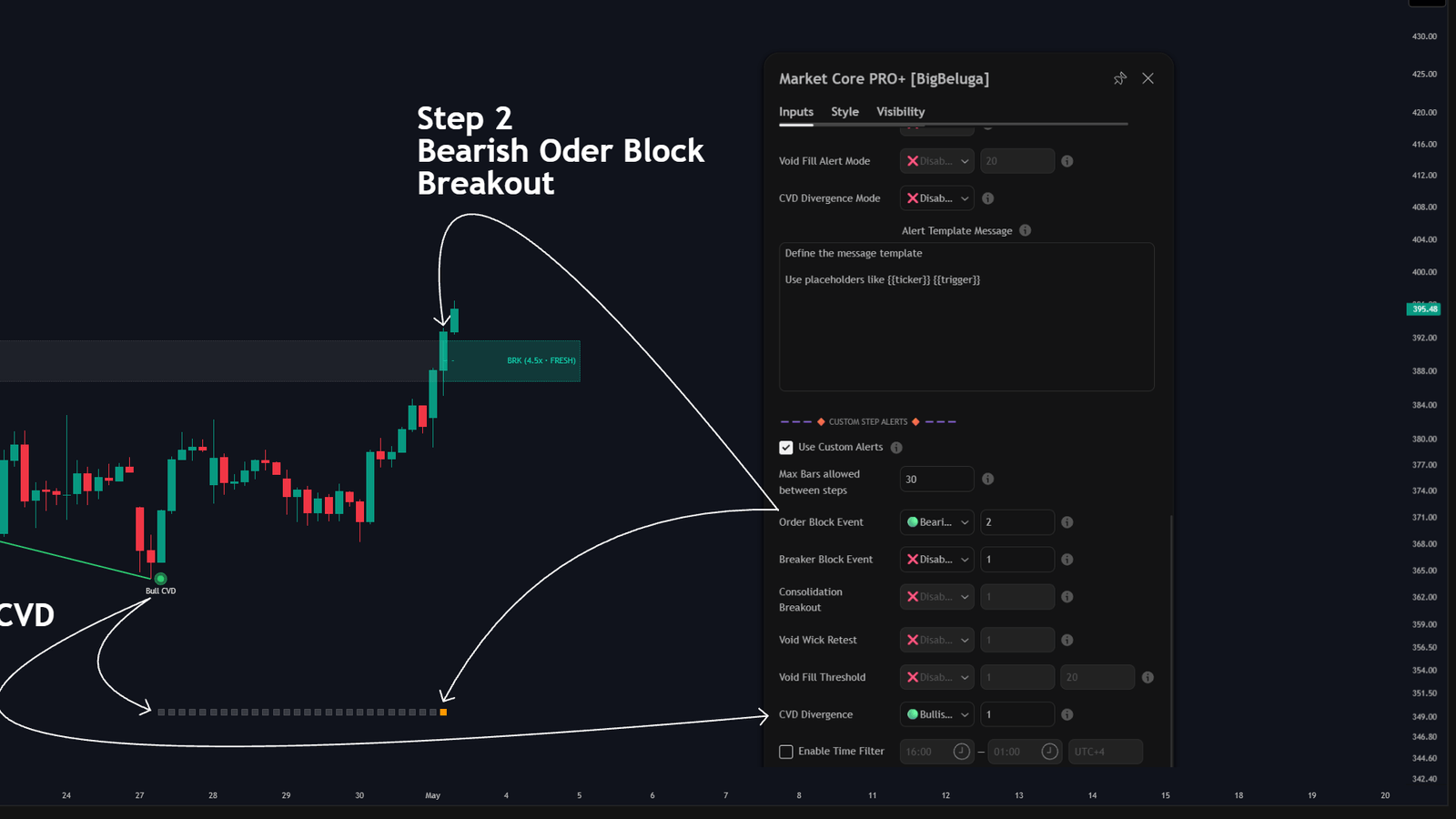
A two-step sequence: a bullish CVD divergence, then a bearish order block breakout
A single event tells you very little on its own. A CVD divergence followed by an order block breakout
tells you that exhaustion was confirmed by structure — and that is the kind of sequence this engine is
built to capture.
## Setup controls
- **Use Custom Alerts** — turns the whole sequence engine on or off.
- **Max Bars Allowed Between Steps** — the countdown. Once step 1 fires, the engine starts counting
bars; if the next step does not happen within that window, the sequence resets to the beginning.
{% hint style="info" %}
Reset behaviour is the point of the bar limit. Without it, a condition from last week could still
complete a sequence with a fresh signal today.
{% endhint %}
## Steps 1 to 5
Every condition is assigned a step number between 1 and 5. That number is what turns a list of
conditions into a sequence.
- **Sequential steps** — different step numbers run in order. Step 2 must arrive on a later bar than
step 1 before the sequence moves forward.
- **Simultaneous steps** — the same step number means both conditions have to hit on the exact same
candle to satisfy that step.
Available conditions, each with its own step field:
| Condition | What it fires on |
| ------------------------- | -------------------------------------------------------------------------------- |
| Order Block Event | Created, touch or break, in any, bullish or bearish variants |
| Breaker Block Event | Touch or break of a breaker, in any, bullish or bearish variants |
| Consolidation Breakout | Any, bullish or bearish breakout, with or without the volume delta qualifier |
| Void Wick Retest | Low wick under a bullish void, high wick over a bearish void |
| Void Fill Threshold | A void reaching the fill percentage you set on the same row |
| CVD Divergence | Any, bullish or bearish divergence |
{% hint style="info" %}
A condition can only be used in a sequence while its module is enabled in the main settings. If the
chart is not drawing order blocks, an order block step has nothing to detect.
{% endhint %}
## External source conditions
Three external sources let you pull other series into the sequence — another indicator, a moving
average, price itself.
| Setting | Description |
| ----------------- | --------------------------------------------------------------------------------------------- |
| Source | The series that is evaluated. |
| Condition | Equal, Greater Than, Less Than, Crossing Over, Crossing Under, Crossing, True or False. |
| Comparison target | The value the source is compared with. Not used by True or False. |
| Step | Which step of the sequence this source belongs to. |
Selecting True or False turns the source into a binary condition, which is how you require a state
("price above the 200 EMA") rather than an event.
## Time filter
**Enable Time Filter** restricts the whole sequence to a session window, with its own timezone. Any
step that fires outside the window is ignored, so an overnight sequence cannot complete before you are
watching.
## Visual tracking
The indicator draws a tracker at the bottom of the chart so the state of a sequence is always visible:
- The **grey bar** appears the moment step 1 fires and stays for as many bars as the limit allows. It
means the engine is waiting for the next step.
- The **orange square** marks the bar where the sequence completed and the alert fired.
In the capture above, step 2 is a bearish order block breakout: the grey bar shows the window opened
by the first step, and the square marks the completed sequence.
## How to create a Custom Step Alert
{% stepper %}
{% step %}
### Turn the sequence engine on
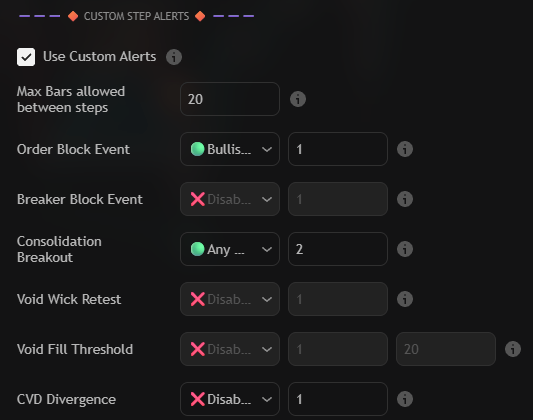
Check **Use Custom Alerts** and set **Max Bars allowed between steps** — 20 bars by default. Until the
engine is on, the condition dropdowns are only display filters and no sequence is tracked.
Use Custom Alerts, the bar window and the condition rows in the CUSTOM STEP ALERTS group
{% endstep %}
{% step %}
### Assign the steps
Move every condition you want to use from Disabled to its event, then type a step number next to it.
In the capture above **Order Block Event** is set to a bullish event on step `1` and **Consolidation
Breakout** to any breakout on step `2`, so the breakout only counts once a bullish order block event
has already opened the window. Anything you leave on Disabled is ignored by the sequence.
{% endstep %}
{% step %}
### Add outside filters (optional)
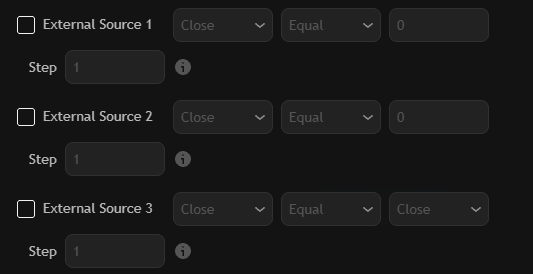
Enable any of the three external sources to pull another series into the sequence — a moving average,
RSI, or price itself.
External Source 1 to 3: source, condition, comparison value and step number
1. Check the **External Source** box.
2. Pick the series from the source dropdown.
3. Choose the condition — Equal, Greater Than, Less Than, Crossing Over, Crossing Under, Crossing,
True or False.
4. Type the comparison value (not used by True and False).
5. Give it a **Step** number so the condition is checked at the right point in the sequence.
{% endstep %}
{% step %}
### Restrict the sequence to a session (optional)
Enable **Time Filter**, set the from and to times and pick the timezone. Steps that happen outside the
window are ignored, so a sequence cannot complete while you are asleep at the chart.
The time filter row: session start, session end and timezone
{% endstep %}
{% step %}
### Create the alert in TradingView
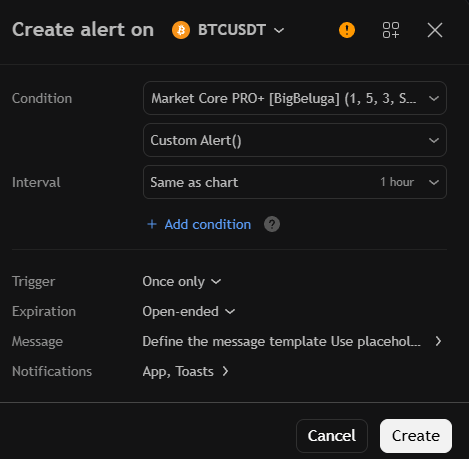
Press Alt + A (or the clock icon in the right toolbar) and configure the dialog:
Market Core PRO+ with the Custom Alert() option selected in the second dropdown
- **Condition:** `Market Core PRO+`
- **Second dropdown:** `Custom Alert()`
- **Trigger:** once only, so the alert keeps watching for new sequences
- **Name / Message:** name the alert after the sequence it watches, and write a message that tells you
which sequence completed.
Create the alert once. The engine now watches for your steps and fires when the whole chain completes
inside the bar window.
{% endstep %}
{% endstepper %}
## Settings
| Settings | Description |
| ------------------------------- | ------------------------------------------------------------------------------ |
| Use Custom Alerts | Enable the multi-step sequence engine. |
| Max Bars Between Steps | Bars allowed between two steps before the sequence resets. |
| Module rows | Condition plus step number for order blocks, breakers, breakouts, voids and CVD. |
| Void Fill Threshold | Fill percentage used by the void fill step (100% means full mitigation). |
| External Source 1 / 2 / 3 | Source, condition, comparison target and step for outside series. |
| Enable Time Filter | Limit the sequence to a session, with its own timezone. |