> For the complete documentation index, see [llms.txt](https://docs.bigbeluga.org/llms.txt).
> Markdown versions of documentation pages are available by appending `.md` to page URLs; this page
> is available as
> [Markdown](https://docs.bigbeluga.org/toolkits-pro-plus/market-core-pro/any-alert-function-call.md).
# Any alert() Function Call
Market Core PRO+ sends every module through a single TradingView alert. Instead of creating one alert
per pattern — and filling your alert slots — you choose which events matter inside the indicator
settings and let one `Any alert() function call` alert carry all of them.
## Before you start
An alert mode only works while its module is enabled. Order block alerts need **Order Blocks** on,
breakout alerts need **Consolidation Range** on, void alerts need **Liquidity Voids** on, and
divergence alerts need **CVD Divergence** on. While a module is switched off, its alert dropdown stays
inactive.
## What you can alert on
| Module | Alert modes |
| ----------------------- | ---------------------------------------------------------------------------------------------------------------------------------- |
| Order Blocks | Any OB event, any/bullish/bearish OB created, any/bullish/bearish OB touch, any OB break, bullish OB break down, bearish OB break up |
| Breaker Blocks | Any breaker event, any/bullish/bearish breaker touch, any breaker break, bullish breaker break down, bearish breaker break up |
| Consolidation Breakout | Any breakout, any bullish/bearish breakout, plus the four volume delta variants (bullish or bearish with positive or negative delta) |
| Take Profit | Any TP hit (TP1/TP2/TP3), TP1 hit, TP2 hit, TP3 hit |
| Stop Loss | Stop loss hit |
| Void Retest | Low wick under a bullish void, high wick over a bearish void, both wicks |
| Void Fill | Bullish fill %, bearish fill %, both — against the fill threshold |
| CVD Divergence | Any divergence, bullish divergence, bearish divergence |
## Setting up the alert
{% stepper %}
{% step %}
### Enable the module on the chart
Turn the module on before configuring its alert. If the chart is not drawing the pattern, there is
nothing for the alert to read.
{% endstep %}
{% step %}
### Choose the alert mode
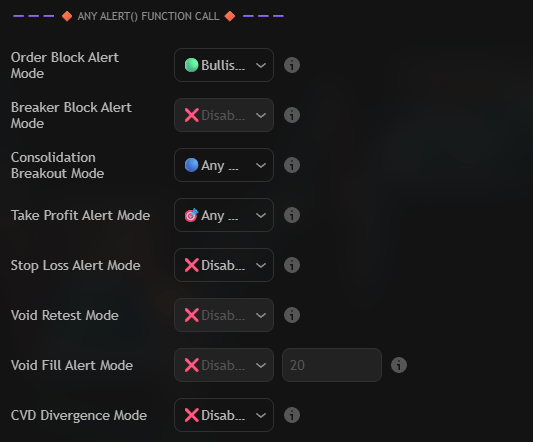
Open the `🔶 Any alert() function call 🔶` group and change the dropdown for the module from
`❌Disabled` to the event you want. Every module keeps its own dropdown, so one alert can listen to
order blocks, breakouts and divergences at the same time.
For the void fill alerts the fill threshold sits next to the dropdown: 10% to 100% in 10% steps,
20% by default. Set it to 100% if you only want alerts when a void is fully mitigated.
Three modules armed at once: order blocks, consolidation breakouts and take profits. Rows left on Disabled send nothing
{% endstep %}
{% step %}
### Write the message template
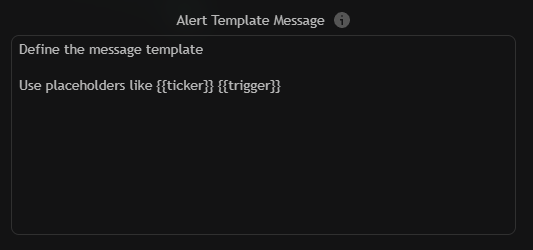
The template is the payload every alert sends — both the popup and the webhook body. Placeholders are
replaced the moment the alert fires.
The Alert Template Message box that carries every module event
```
🚨 Core alert: {{ticker}} ({{interval}}) — {{trigger}} at {{close}}
```
| Placeholder | Description |
| ---------------- | ---------------------------------------------------------------------- |
| `{{ticker}}` | Symbol name without the exchange prefix, e.g. `BTCUSDT`. |
| `{{tickerid}}` | Full ticker identifier, e.g. `BINANCE:BTCUSDT`. |
| `{{exchange}}` | Exchange prefix of the current symbol. |
| `{{close}}` | Close of the current bar. |
| `{{open}}` | Open of the current bar. |
| `{{high}}` | High of the current bar. |
| `{{low}}` | Low of the current bar. |
| `{{volume}}` | Volume of the current bar. |
| `{{interval}}` | Chart timeframe, e.g. `15` or `W`. |
| `{{time}}` | Time of the alert bar. |
| `{{timenow}}` | Current time when the alert fires. |
| `{{trigger}}` | Name of the event that fired — this is what distinguishes the modules. |
{% endstep %}
{% step %}
### Create the TradingView alert
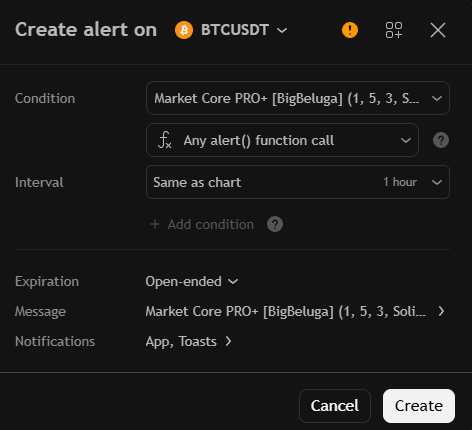
Press Alt + A (or the clock icon in the right toolbar) and configure the dialog:
- **Condition:** `Market Core PRO+`
- **Second dropdown:** `Any alert() function call`
- **Message:** leave the default placeholder text if you want the template above to be used, or paste a
fixed message when you only need a trigger.
The TradingView dialog for a single Any alert() function call alert
Create the alert once. Every module event you enabled in the settings now flows through that single
alert slot.
{% endstep %}
{% endstepper %}
{% hint style="info" %}
The `{{trigger}}` placeholder is what makes a shared template readable. Two alerts from different
modules produce different text, so you can tell a breakout from a divergence without opening the chart.
{% endhint %}
## Webhooks and automation
Because the template is the request body, the same alert can drive a webhook: point the TradingView
notification at your endpoint and parse `{{trigger}}` to route each event. For sequences that should
only fire when several conditions line up, use [Custom Step Alerts](/toolkits-pro-plus/market-core-pro/custom-step-alerts).